-

-

-

-

-
CopyToClipboard

- Enable QuickPay by Broker
- Enable QuickPay by Invoice
Enable Quick Pay for C.H. Robinson
- Log in to your Triumph Payments Carrier Profile.
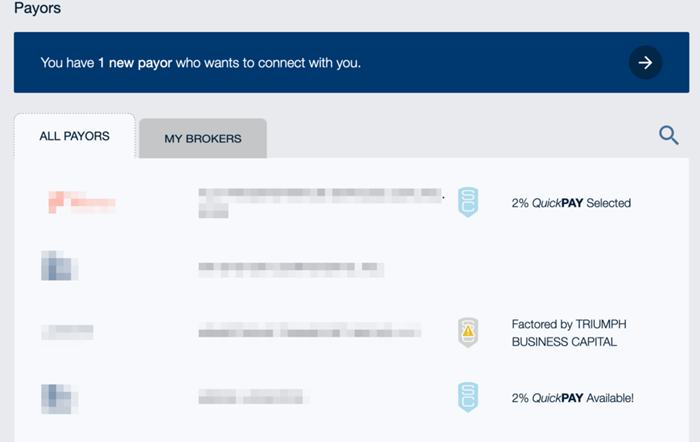
- Navigate to the Payors section on the dashboard, located at the bottom of the page.
- Select C.H. Robinson under Default Term and Payment and select Edit.
- Select the QuickPay option.
Enable Quick Pay by Invoice
- Log in to your Triumph Payments Carrier Profile.
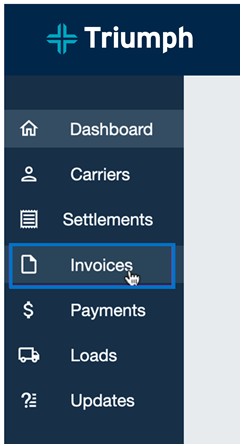
- Select Invoices, located on the left-side menu.
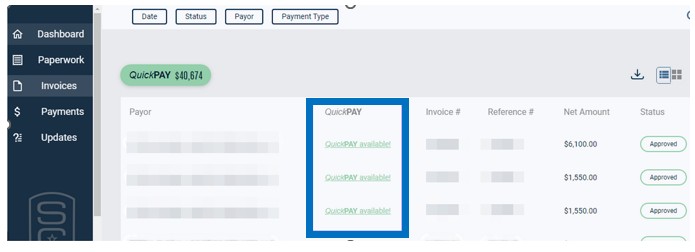
- Click on QuickPay Available for the invoice you want QuickPay enabled on.
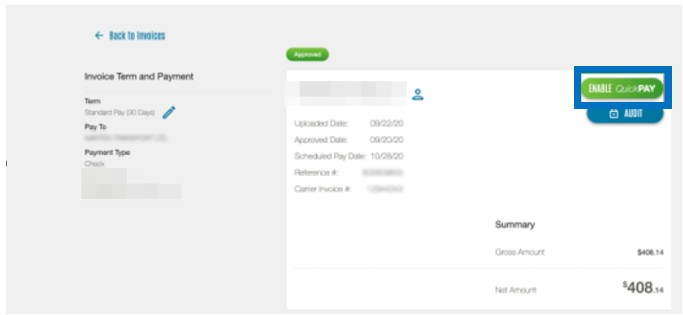
- Select Enable QuickPay.
NOTE: QuickPay terms will only begin once an invoice is uploaded on Triumph Payments and your paperwork has been approved.
For more information on Quick Pay within the Triumph Pay portal, click here.
Quick Pay is part of C.H. Robinson Financial™, a suite of flexible payment solutions designed for carriers like you. Whether you choose Quick Pay, Factoring, or Standard Pay, we’re here to help you grow.
OnThisPage
- Enable QuickPay by Broker
- Enable QuickPay by Invoice